
Adding iCloud Sharing to Bills to Budget
The easy parts (or so I thought...)

I’ve spent a fair amount of time the last few days trying to hone the user experience for the upcoming iCloud Sharing feature that’s coming to Bills to Budget later this summer, however I’ve hit a few walls. Not only have I been unable to get the experience I want to provide to customers, but it’s actually taken a step back in an important area. And this doesn’t even deal with the actual act of data synchronization - this is the part that should have been (relatively) easy! Let me explain…
Update: Some of the issues described here have been resolved during the iOS 17 beta cycle 🎉. It’s not as clean as I would have liked, though - scroll to the final section for details.
Two Simple Goals
I have two simple goals with the user experience, presented in this order:
Provide a ‘safe’ experience - the data that customers enter into Bills to Budget is personal. It includes the regular bills that they pay, their pay schedule, and if they subscribe to the Plus package, it also includes their spending budgets. There are a lot of reasons for wanting to keep this private, and because of this, I want to explicitly disable any possibility that a customer could create a share as a ‘public’ link that anyone can access, even accidentally. This data should remain private, and only those who have explicitly been granted access should be able to see it.
Provide a great, modern experience - I never really noticed this until I started building a feature around the Share Sheet, but boy, is it cluttered. There are options across the top to share to your common contacts, which is great, but scrolling down, you quickly find a list of unrelated App Icons, and then a long list of other actions that Apps can expose. Look - the Ivory app truly is great, but given my #1 goal above, it makes zero sense for it to be a sharing target for budget data!
As I mentioned, this is an ordered list of goals - if I can find a way to provide a great experience, but it results in data being accidentally shared publicly, then I need to put the great experience away for another day. Unfortunately, I’m not sure that I can fully satisfy either of these goals. I’m hoping that someone reading this can provide some clues, or directions that I haven’t seen or thought of.
The User Experience
As is appropriate for any ordered list, I’ll discuss it here in exactly reverse order. 🤷♂️
There are at least four options currently available (that I found, anyway) to manage a data sharing flow, that came to us in two generations:
The old generation: UIActivityViewController (which is just the Share Sheet) and UICloudSharingController (specifically built for CloudKit Sharing, allowing user management, permission management, etc)
The new generation: SwiftUI’s ShareLink, and the new SWCollaborationView
The old generation options are what we all know and ‘love’ — the Share Sheet, which I’ve already denigrated enough, and the standard Sharing controls, which is effective and clear, but a bit… boring.


The new generation options are obviously what I was more excited to look into, but found only disappointment — I was disappointed to find that the ShareLink is basically just a wrapper around UIActivityViewController, but without the ability to remove any of the clutter (as far as I can tell, at least). My expectation - probably a bit naive - is that after a Share was created, this view would present the list of people it’s shared with, but alas, that’s not the case. To emphasize this, Apple put out a nice sample app last year that uses the ShareLink, and they switch between the Share Link and the UICloudSharingController, depending on the existence of a Share.
The SWCollaborationView is really what I wanted - it was introduced with iOS 16, and presents a more modern, streamlined UI, without any of the clutter from the Share Sheet. Even better, it encourages collaboration and communication, linking back to the original Messages conversation, and putting communication controls up front - it’s exactly what I was looking for!
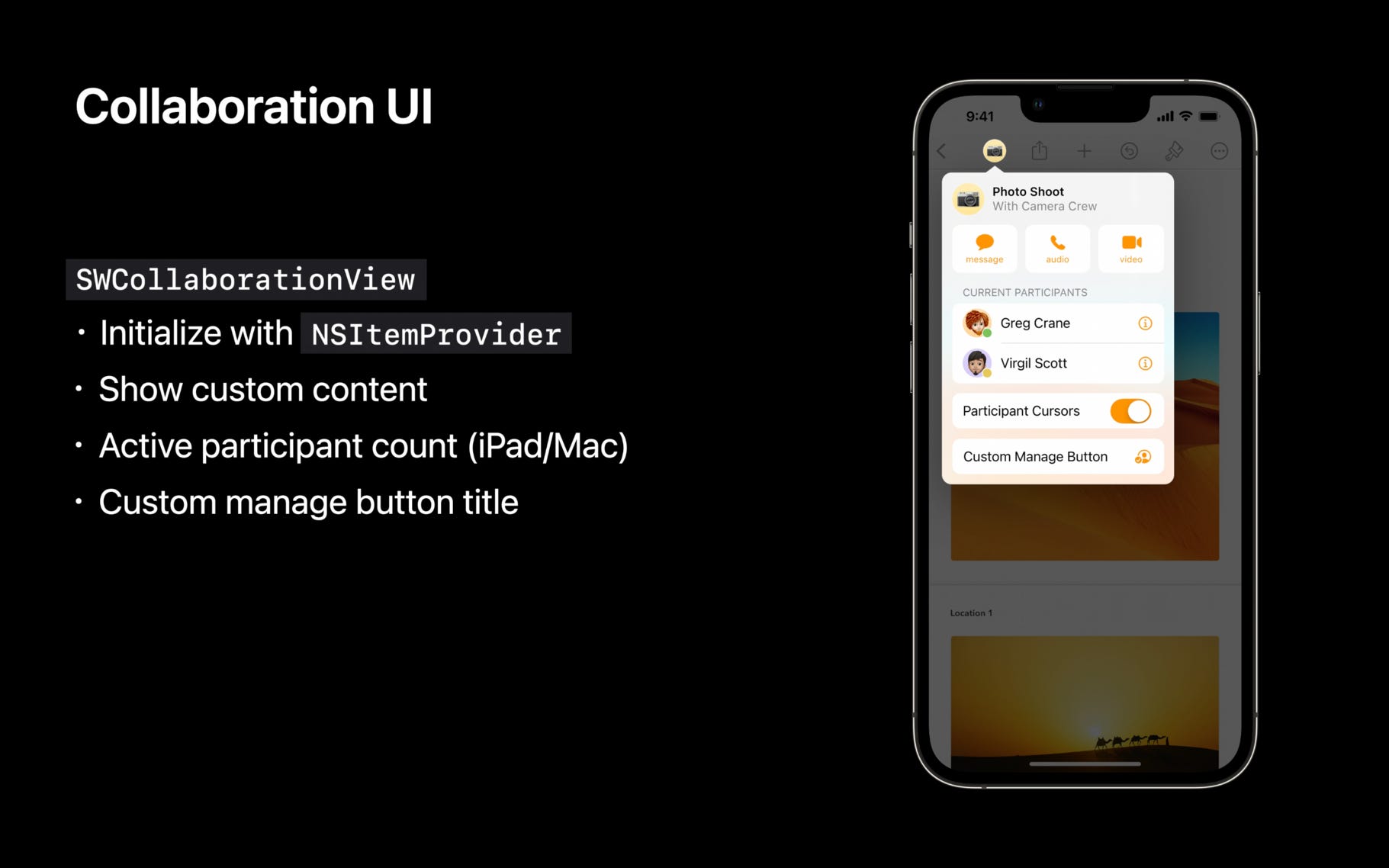
Sadly, it seems to be completely incompatible with SwiftUI, and has several issues - this StackOverflow entry is an indirect claim to this incompatibility, but indicates that this message came from an Apple engineer via a Technical Support Incident. (I will be submitting a Feedback on this after completing this write-up).
I’m less experienced with integrating SwiftUI and UIKit, so it’s entirely possible that I missed something, so let’s talk about the issues I ran into:
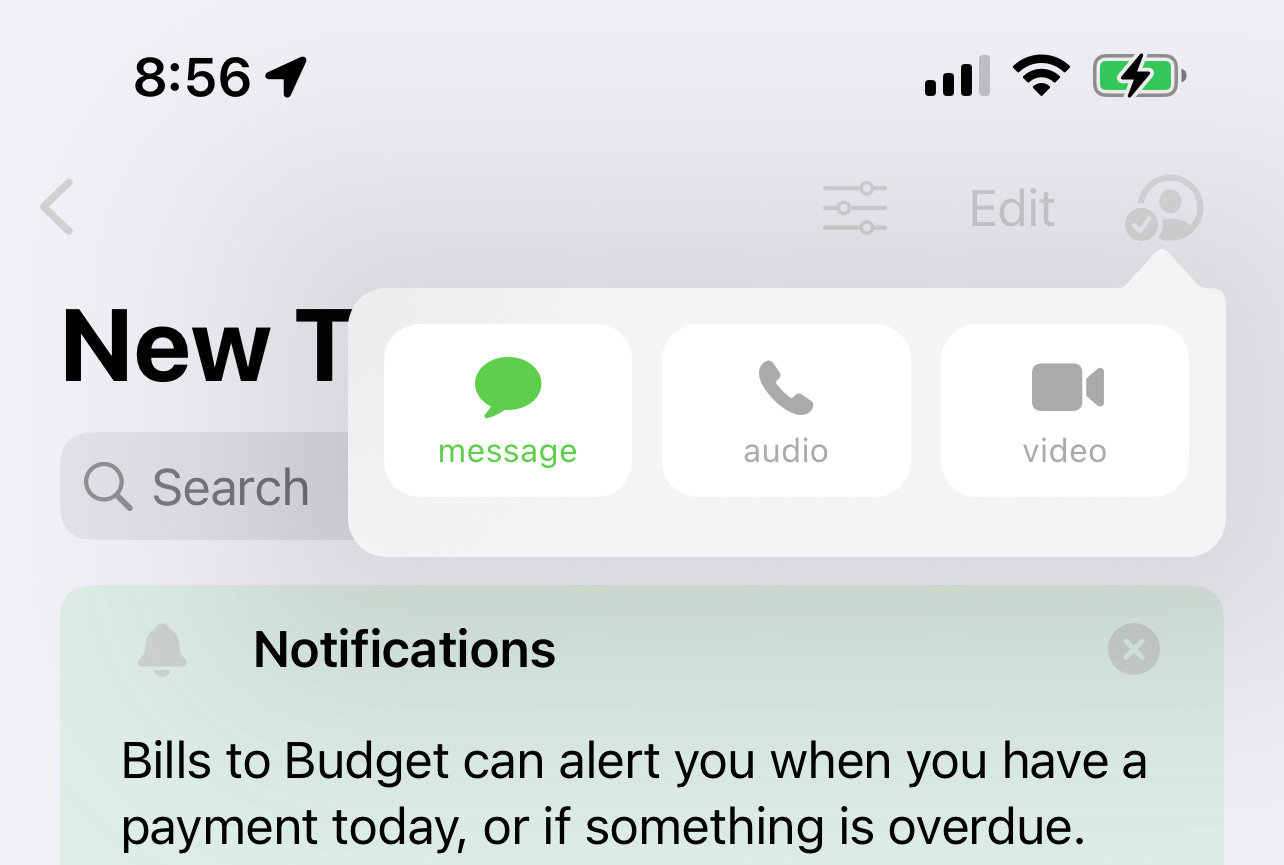
Initially, the button that’s presented isn’t clickable at all - only after giving it a fixed width and height was I able to open any kind of popup.
The button icon never changes — it always shows the “person.crop.circle.badge.checkmark” symbol, which implies that a Share exists.
The button does show the number of people on the share, but given the need to provide a fixed width, you need to adjust this manually to make it visible at all.
Once I did get the popup working, it was… not what I was looking for. I found no way to customize the header, or even provide any header, and while it does show a ‘Manage Share’ link if there is an existing Share, tapping it doesn’t open any window more often than not.
You can create a share with this mechanism, but it doesn’t honor provided the configuration - it only allows me to create a Share in read-only mode. This, at least, is safe, and can be later modified (but only with the UICloudKitShareController - see the previous bullet), but it’s not likely to be the most common use case.
Ok, so providing the experience I want isn’t going to happen just yet — surely, I can provide the safety in my first goal, right? Right?
Creating Private Shares
Here’s where it gets really discouraging — the API’s listed above all support generally the same configuration options, and privacy and permission management is important enough (especially to Apple) that this should be very straight forward.
Turns out, even Apple can have bugs here. These API are similar between the new generation and the old generation, but there were some clarity changes made in the new generation, and I expect these bugs were introduced then. With any CloudKit Sharing configurations, there are generally two groups of relevant configuration - is the Share intended to be public or private (where only explicitly invited people can access), and is the share read-only or read-write.
As mentioned in my goals, I wanted to remove the public option, which is possible via the API’s. Using the UICloudSharingController, this is done via the slightly awkward `availablePermissions` field, which combines all of these options into a single array:
cloudSharingController.availablePermissions = [ .allowPrivate, .allowReadOnly, .allowReadWrite ]
It’s a bit strange to combine these into a single array, but naming is clear here, so it’s not terribly hard to understand how this should work. This has been improved with the new `CKShareTransferRepresentation` API (which ShareLink uses), and has been retrofitted into the NSItemProvider API (which UIActivityViewController and SWCollaborationView both support):
CKAllowedSharingOptions(allowedParticipantPermissionOptions: .any, allowedParticipantAccessOptions: .specifiedRecipientsOnly)
The options are now treated separately, and is even more expressive, ensuring that a valid configuration is provided.
The new API is nice, and when used with the UIActivityViewController, works exactly as you would think - presenting the expected UI both in the Share Sheet itself, and in the Share that is presented in the Messages app.


Through the UICloudSharingController, though? Well, that’s a different story. The presented sheet actually allows this to be configured in two places — with the ‘Share Options’ button, and with the ‘Share With More People’ button. Using the configuration I listed above, the ‘Share Options’ button results in the expected screens, however the ‘Share With More People’ button give me exactly the wrong results!


Even more interesting - changing the permission configuration to `[ .allowPrivate, .allowPublic, .allowReadWrite ]` — which is very clearly wrong — results in this scenario exactly reversing, where ‘Share With More People’ shows the correct configuration, but ‘Share Options’ shows the incorrect one!
I have, of course, already filed a Feedback on this (FB12260268), and I actually spoke with some CloudKit Engineers last week during WWDC, so I’m hopeful that this can be fixed quickly - as it relates to permissions and privacy, this bug is a pretty big deal.
So where does this leave Bills to Budget?
Frankly, I’m not sure right now — I’m not excited about releasing the Cloud Sharing capability with the possibility that a customer could accidentally share their data publicly. I am comforted somewhat by the fact that creating a Share is safe, it’s only modifying that share that will expose this flaw, but it’s not a great result.
I do plan on rolling out the TestFlight this week, as planned, with plenty of documented caveats, and I will be revisiting this throughout the summer. Frankly, part of the goal behind writing this up was to allow myself to shift my focus elsewhere for a few weeks, and be able to refresh my memory as quickly as possible when it’s time to revisit - I don’t want to spend 2 days just to relearn everything included here!
Of course, I’m hoping all of the bugs I listed above will be addressed by Apple, and will be done in the iOS 16 branch. Requiring iOS 17 for my iCloud Sharing feature will likely limit my TestFlight over the summer - how many entire families out there all run the betas?
It’s entirely possible, of course, that I’m missing something here — if anyone is more experienced with these API’s, or knows a way around the limitations, please, please reach out!
Update - Some issues resolved for iOS 17!
I found the permission issue just prior to WWDC 2023, and I was able to get a lab to discuss this with some of the Engineers on the CloudKit team - they were great, told me that this was definitely a bug and asked me to file a Feedback, which I did.
In early August, I got an email asking me to re-evaluate that Feedback, and it turns out they fixed it! See, Feedbacks sometimes do matter!
It’s not quite as clean as I had hoped, though — while they fixed the behavior of the UICloudSharingController initializer that can accept an existing Share, they also deprecated it, recommending that you use the UIActivityViewController.initWithActivityItemsConfiguration` instead.
This is a problem, since the two mechanisms are not equivalent. The recommended solution is just the Share Sheet - it can allow you to share entities with more people, but it does not allow you to view existing participants in the Share, remove participants, change permissions, etc.
So in effect, they’ve fixed the bad behavior, while at the same time saying “don’t do this” — the only other option that I’m aware of is to implement custom UI flows, which I’ve already, and which I’m going to stick with.
And of course, the beautiful new Shared With You views driven by SWCollaborationView, and released just last year are still completely unusable if you use SwiftUI 🤷♂️